Everything you need to go from unboxing to your first sale. Setup walkthroughs, material parameter charts, and step-by-step project tutorials created by our applications team and community contributors.
Follow these four steps and you will be engraving within 30 minutes of opening the box.
Remove the F1 from its packaging and place it on a flat, stable surface. The machine weighs approximately 4 kg and fits on any standard desk. Remove all protective inserts and the lens cap.
Download xTool Creative Space from the official website. Available for Windows 10+ and macOS 11+. Installation takes under 3 minutes. Connect the F1 via the included USB-C cable.
Run the one-time camera calibration using the included test card. This aligns the camera preview with the actual laser path. Takes about 2 minutes and ensures placement accuracy for all future jobs.
Load the sample file included in Creative Space. Place the included test material (anodized aluminum card) in the work area. Hit start. Your first engraving should finish in under 2 minutes.
These are starting-point parameters based on our lab testing. Always run a small test area first, as material thickness, coating, and brand can affect results.
| Material | Power (%) | Speed (mm/s) | Passes | Notes |
|---|---|---|---|---|
| Stainless Steel 304 | 80-100 | 800-1200 | 1 | Dark mark; reduce speed for deeper engrave |
| Anodized Aluminum | 40-60 | 1500-2000 | 1 | Removes anodizing to reveal silver base |
| Brass | 90-100 | 600-900 | 1-2 | Best results on polished surfaces |
| Gold / Gold Plate | 30-50 | 1000-1500 | 1 | Low power to avoid burning through plating |
| Titanium | 70-90 | 500-800 | 1-2 | Color marking possible by varying speed |
| Material | Power (%) | Speed (mm/s) | Passes | Notes |
|---|---|---|---|---|
| Basswood (3mm) | 60-80 | 200-400 | 1 | Can cut up to 3mm with 2 passes at full power |
| Leather (vegetable-tanned) | 20-40 | 300-500 | 1 | Start low; darker leathers need less power |
| Acrylic (clear, 3mm) | 80-100 | 100-200 | 2-3 | Engraving only; may not fully cut clear acrylic |
| Cardstock / Paper | 10-20 | 600-1000 | 1 | Cuts cleanly; keep power low to avoid charring |
| Glass (coated) | 70-90 | 150-300 | 1-2 | Apply masking tape first for cleaner results |
These parameters are guidelines for the standard xTool F1 (2W fiber + 10W diode). The F1 Ultra has different power ratings; refer to its dedicated settings page. Individual results vary with material brand, thickness, surface finish, and ambient temperature.
Real projects created by xTool F1 users and our applications team. Each includes approximate material cost and engraving time.
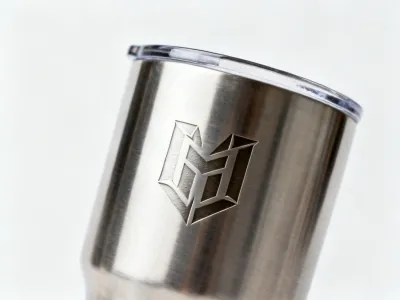
Corporate gift or retail product. Fiber laser, 80% power, 1000mm/s. Each tumbler takes about 90 seconds to engrave a 50mm x 30mm logo. Material cost: approximately $5-8 per blank tumbler.
Fiber Laser ~90 sec / unit
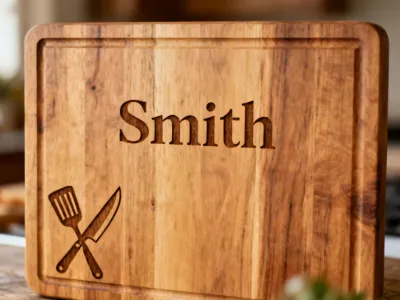
Wedding gift or housewarming present. Diode laser, 70% power, 300mm/s on maple. A 100mm x 80mm family name design takes about 4 minutes. Material cost: approximately $8-15 per board (pre-cut blanks).
Diode Laser ~4 min / unit
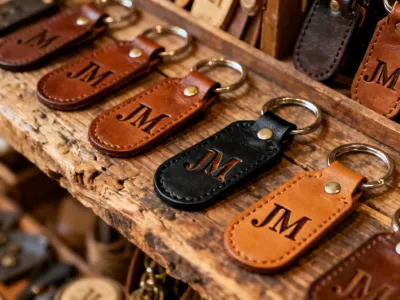
Fast-moving retail item or event favor. Diode laser, 25% power, 400mm/s on vegetable-tanned leather. Each keychain engraves in under 15 seconds. Material cost: approximately $1-2 per blank (bulk sourced).
Diode Laser ~15 sec / unit
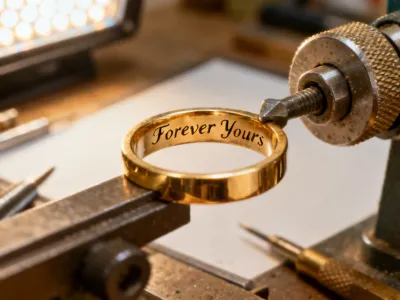
Wedding bands and anniversary rings. Fiber laser, 40% power, 1200mm/s with rotary attachment. 20 characters of text takes about 8 seconds. Requires the optional RA2 Pro rotary attachment for proper ring holding.
Fiber Laser + Rotary ~8 sec / ring
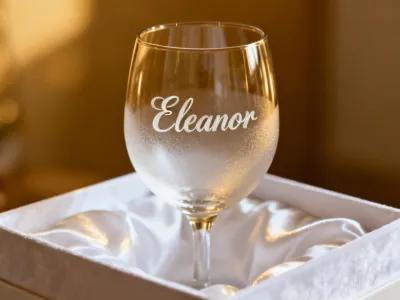
Wedding favors and wine club merchandise. Diode laser on masking-taped glass, 80% power, 200mm/s. Results in a frosted white finish. Apply and smooth tape carefully; air bubbles cause inconsistent marks. Each glass takes about 3 minutes.
Diode Laser ~3 min / unit
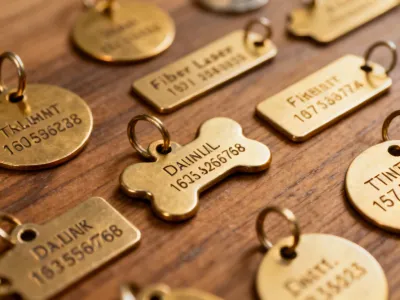
High-volume market stall or online product. Fiber laser on stainless steel blanks, 90% power, 900mm/s. Batch mode handles 20+ tags per run on a single bed. Each tag takes about 20 seconds. Material cost: approximately $0.50-1.00 per blank.
Fiber Laser ~20 sec / unitChoosing between the F1 models and understanding how they compare to other laser types helps you invest in the right tool for your workflow.
| Specification | xTool F1 | xTool F1 Ultra | xTool F1 Lite |
|---|---|---|---|
| Fiber Laser Power | 2W (1064nm) | 20W (1064nm) | None |
| Diode Laser Power | 10W optical (455nm) | 20W optical (455nm) | 10W optical (455nm) |
| Work Area | 115 x 115 mm | 165 x 165 mm | 115 x 115 mm |
| Weight | ~4 kg | ~5.5 kg | ~3.5 kg |
| Metal Engraving | Yes (fiber) | Yes (fiber, faster) | No |
| Galvo Speed | Up to 4000 mm/s | Up to 10000 mm/s | Up to 4000 mm/s |
| Released | 2022 | 2024 | 2023 |
| Price Range | $1,599 – $1,899 | $3,999 – $4,499 | $899 – $1,099 |
| Best For | Small businesses needing metal + organic engraving | Production shops needing speed and larger work area | Hobbyists and educators working with non-metal materials only |
Each laser type has distinct strengths and trade-offs. No single technology is ideal for every application.
| Parameter | Fiber Laser (1064nm) | Diode Laser (455nm) | CO2 Laser (10.6μm) |
|---|---|---|---|
| Wavelength | 1064 nm | 445–455 nm | 10,600 nm (10.6 μm) |
| Typical Power (desktop) | 2W–50W | 5W–20W optical | 40W–150W |
| Metals | Excellent (direct marking) | Limited (marking spray required) | Poor (cannot mark bare metal) |
| Wood & Leather | Limited | Good (engraving + thin cutting) | Excellent (engraving + cutting) |
| Acrylic Cutting | No | Thin only (≤3mm) | Excellent (up to 20mm+) |
| Source Lifespan | ~100,000 hours | ~10,000–20,000 hours | ~2,000–8,000 hours (tube) |
| Typical Desktop Price | $1,500–$5,000 | $300–$2,000 | $2,000–$10,000 |
| Safety Class (enclosed) | Class 1 | Class 1 | Class 1 |
| Key Limitation | Small work area in galvo systems; limited organic material depth | Cannot mark bare metals; slower on thick materials | No metal engraving; tube replacement cost; larger footprint |
This comparison reflects general capabilities of desktop-class systems as of 2024. Specific performance varies by manufacturer, model, and configuration. The xTool F1 combines fiber and diode in one unit, covering the first two columns but not the CO2 column.
Watch step-by-step demonstrations from our applications team and experienced community members.
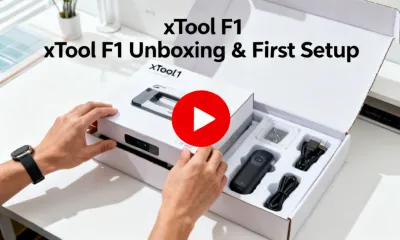
Complete walkthrough from opening the box to your first engraving. Covers camera calibration, software installation, and your first test cut on the included sample material.
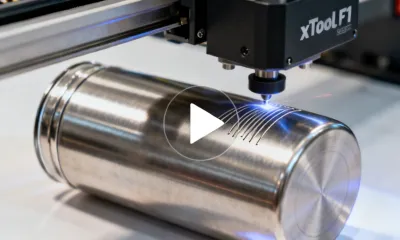
How to set up the rotary attachment, align a cylindrical tumbler, and dial in fiber laser settings for a crisp, permanent mark on stainless steel drinkware.
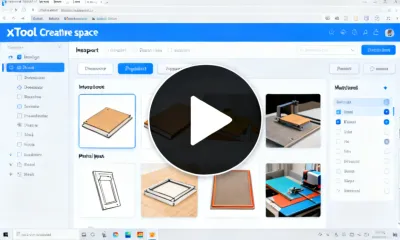
Master the software: import designs from SVG and AI files, use material presets, set up batch processing, and calibrate the camera for precision placement.
Get your xTool F1 and join over 30,000 makers, businesses, and educators who have turned laser engraving from a wish list item into a daily revenue stream.
Get Your Free Quote View Products